
Why PageSpeed Is Important for Your Website and SEO
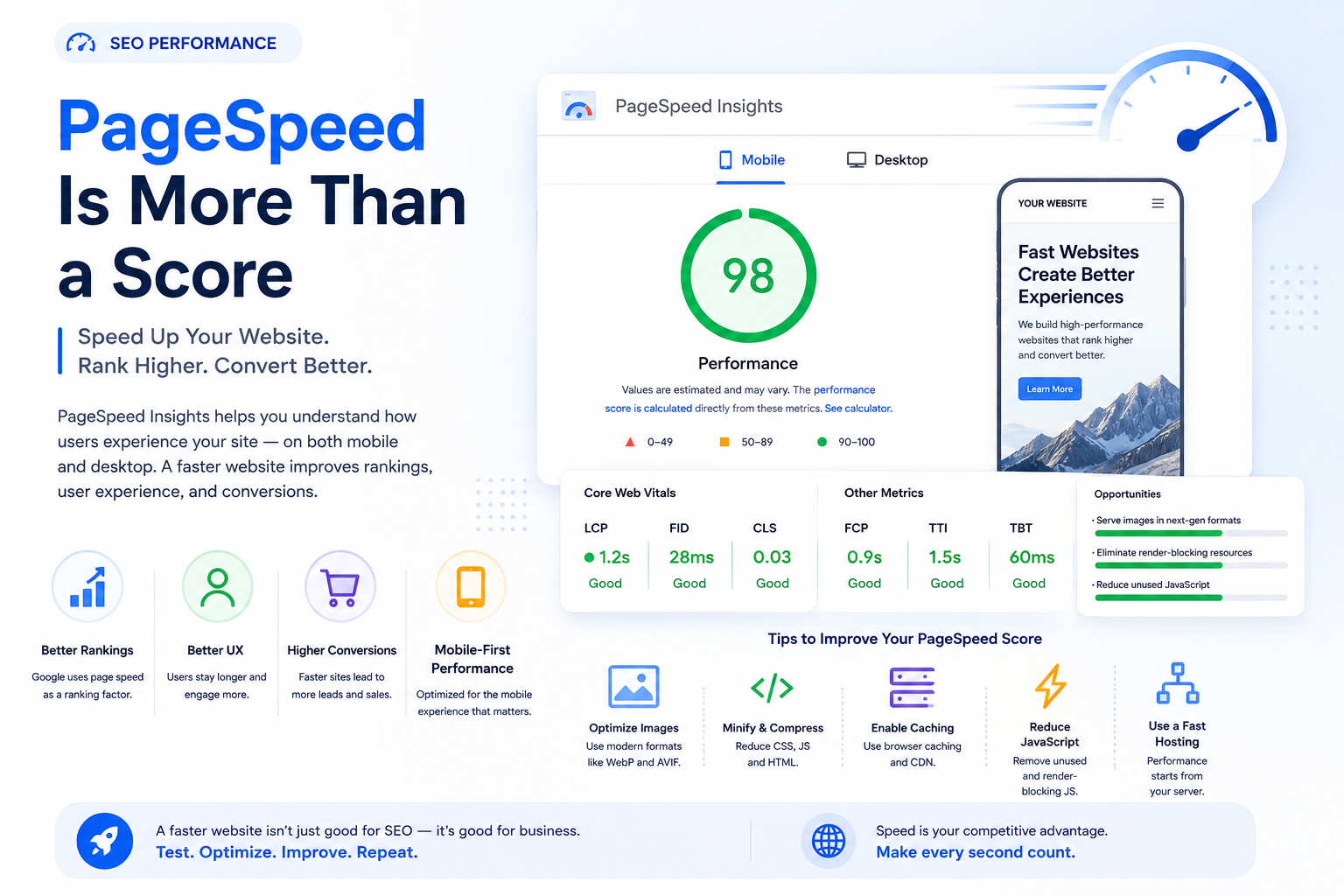
A website can have excellent content, strong backlinks, and a good design, but if it loads slowly, users may leave before they ever see what it offers.
That is why PageSpeed has become an important part of modern website performance and SEO.
Google’s PageSpeed Insights evaluates how a page performs on both mobile and desktop and provides recommendations for improving it. More importantly, Google’s Core Web Vitals focus on real-world user experience, including loading speed, responsiveness, and visual stability.
PageSpeed alone will not make a website rank number one. However, a slow website can create problems for users, conversions, and overall search performance.
What Is PageSpeed?
PageSpeed describes how quickly a webpage becomes usable and visible to visitors.
It is not simply about how many seconds it takes until every file finishes loading. Modern performance measurement looks at what the user actually experiences while the page loads.
Google PageSpeed Insights evaluates pages and highlights opportunities related to:
loading performance
image optimization
JavaScript execution
unused CSS
server response
caching
layout stability
The goal is not simply to reach a perfect score.
The goal is to create a website that feels fast, responsive, and stable.
Why PageSpeed Matters for SEO
Google has confirmed that Core Web Vitals are used by its ranking systems, while also making clear that good Core Web Vitals alone do not guarantee high rankings. Content relevance, quality, and many other signals still matter.
This makes PageSpeed part of a larger SEO strategy.
A technically strong website should combine:
quality content
good internal linking
relevant backlinks
mobile usability
crawlability
fast performance
PageSpeed supports that foundation.
PageSpeed and Core Web Vitals
When working on website performance, three Core Web Vitals are especially important.
Largest Contentful Paint
LCP measures how quickly the main visible content loads.
Google recommends an LCP of 2.5 seconds or less for a good user experience.
Common causes of poor LCP include:
oversized hero images
slow hosting
render-blocking CSS
slow server response
unnecessary scripts
Improving the main content load time can make the entire website feel significantly faster.
Interaction to Next Paint
INP measures how quickly a page responds when a visitor interacts with it.
A good INP is 200 milliseconds or less.
Poor INP is often caused by:
too much JavaScript
heavy third-party scripts
large frontend frameworks used inefficiently
complex event handlers
chat and tracking widgets
A page may appear fully loaded but still feel slow if buttons and menus respond poorly.
Cumulative Layout Shift
CLS measures visual stability.
Google recommends a CLS of 0.1 or less.
You have probably experienced poor CLS before: you are about to click a button, an image suddenly loads, and the entire page moves.
Common causes include:
images without defined dimensions
ads loading late
dynamically inserted banners
font changes during loading
A stable layout creates a much better user experience.
Faster Websites Create Better User Experiences
SEO should ultimately support users.
Imagine opening two websites that provide similar information.
The first website starts displaying useful information almost immediately.
The second shows a blank screen, loading animation, or incomplete layout for several seconds.
Most users will naturally prefer the first experience.
Google’s Search documentation recommends achieving good Core Web Vitals not only for Search success but also because they contribute to a better user experience overall.
Speed affects how users perceive a website.
A fast website feels:
more professional
easier to navigate
more reliable
more polished
That matters whether you run a blog, corporate site, e-commerce store, SaaS platform, or lead-generation website.
PageSpeed Can Affect Conversion Performance
Website performance is not only an SEO issue.
It is also a business issue.
Every page has a purpose.
You may want visitors to:
complete a contact form
purchase a product
request a quotation
register an account
read another article
contact your company
If users become frustrated before completing these actions, traffic alone does not help much.
This is why performance should be considered part of conversion optimization, not only technical SEO.
Mobile PageSpeed Is Especially Important
Performance issues are often much more noticeable on mobile devices.
Desktop users may have:
faster CPUs
more memory
stable broadband
powerful browsers
Mobile users may be browsing with:
weaker hardware
mobile data
unstable connections
older devices
A website that feels fast on your office computer can perform very differently for a real mobile visitor.
This is why you should always test both mobile and desktop performance.
Images Are Often the Biggest Problem
Images are one of the most common causes of poor PageSpeed.
A homepage may contain a beautiful hero image that is several megabytes in size even though the browser displays it at a much smaller resolution.
This creates unnecessary downloading.
Better image optimization includes:
resizing images correctly
compressing files
using modern formats
serving responsive images
lazy loading images below the fold
Responsive image handling is also part of Google’s broader guidance for creating better experiences across different devices.
Optimizing images can often create one of the fastest performance improvements.
Too Much JavaScript Can Slow Down a Website
Modern websites frequently depend on JavaScript.
JavaScript itself is not bad for SEO, but excessive JavaScript creates performance problems.
Common examples include:
analytics scripts
advertising scripts
social widgets
popup systems
animation libraries
live chat software
tracking pixels
Each script adds additional work for the browser.
Instead of asking whether a script is useful, ask:
Does this script provide enough value to justify the performance cost?
Removing unnecessary JavaScript can improve both loading and interaction performance.
Hosting Also Matters
You can optimize images and scripts perfectly and still have a slow website if your server responds slowly.
Hosting influences:
server response time
database performance
caching
geographic latency
traffic capacity
For an SEO-focused website, hosting should be viewed as part of the technical SEO infrastructure.
Good frontend optimization cannot completely compensate for a very slow backend.
Use Caching Properly
Caching allows browsers, servers, or CDNs to reuse previously generated resources rather than recreating or downloading everything repeatedly.
Effective caching can dramatically reduce loading time.
Depending on your website architecture, caching may include:
browser caching
page caching
object caching
CDN caching
A properly configured cache improves both performance and scalability.
Use a CDN When Appropriate
A Content Delivery Network distributes assets through servers in different locations.
If your server is located in Asia but your visitor is in Europe, downloading every image and script directly from the origin server may introduce unnecessary latency.
A CDN can deliver static resources from a location closer to the visitor.
This is especially helpful for websites with an international audience.
A 100 PageSpeed Score Is Not the Real Goal
One of the biggest mistakes in performance optimization is obsessing over the score itself.
A PageSpeed score is a diagnostic tool.
It is not your SEO ranking.
Google explicitly says that getting good results in tools such as the Core Web Vitals report does not guarantee top rankings.
A website scoring 95 is not automatically better than one scoring 88.
The important questions are:
Does the website load quickly for real users?
Are the Core Web Vitals healthy?
Does the page feel responsive?
Is the mobile experience good?
Are important resources loading efficiently?
Those questions matter more than chasing a perfect number.
PageSpeed Should Be Part of Technical SEO
PageSpeed works best when it is combined with other technical SEO improvements.
A strong technical SEO website should also have:
logical URL structure
correct canonical URLs
XML sitemap
robots.txt configuration
structured data
mobile-friendly design
internal linking
crawlable content
proper redirects
Performance supports all of these efforts by giving users and search engines a cleaner experience.
How to Check Your Website PageSpeed
Google recommends using PageSpeed Insights for individual pages and the Core Web Vitals report in Google Search Console for broader site performance analysis.
A good testing workflow is:
Test your homepage.
Test an important landing page.
Test a blog article.
Test mobile performance.
Review the Core Web Vitals.
Fix the biggest problems first.
Test again.
Do not make dozens of changes at once.
If you optimize gradually, it becomes much easier to identify which improvements actually worked.
What Should You Optimize First?
If your website is slow, start with the biggest problems.
A practical priority is:
Server response and hosting
Large images
Caching
Excessive JavaScript
Render-blocking resources
Layout shifts
Third-party tools
Fixing these areas usually produces much greater improvements than spending hours optimizing tiny files that have almost no impact.